
Home › Forums › FTDI FT4222 LabVIEW Driver Discussions › Error when I try to run the FTDI Driver_forI2C_SPI_GPIO:lvlib:D2xx_Open.vi”
- This topic has 3 replies, 1 voice, and was last updated 3 years, 3 months ago by
 Ajayvignesh MV.
-
AuthorPosts
-
-
April 18, 2023 at 6:25 am #5627
 David ButterfieldParticipant
I’m trying out the demo version of the FTDI LabVIEW driver for I2C SPI GPIO and I’m getting the following error when I try to run the FTDI Driver_forI2C_SPI_GPIO:lvlib:D2xx_Open.vi”
FTDI_Driver_for_I2C_SPI_GPIO.lvlib:D2xx_Error_Decoder.vi
Complete call chain:
FTDI_Driver_for_I2C_SPI_GPIO.lvlib:D2xx_Error_Decoder.vi
FTDI_Driver_for_I2C_SPI_GPIO.lvlib:D2xx_Open.viI’ve tried by Location, serial number, and description and they all give the same error.
Do you know what I’m doing wrong?The FT4222H device shows in my Device Manager as follows:
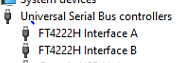
Thank you,
David-
This topic was modified 3 years, 3 months ago by Ajayvignesh MV.
-
This topic was modified 3 years, 3 months ago by Ajayvignesh MV.
-
This topic was modified 3 years, 3 months ago by
-
April 18, 2023 at 6:54 am #5630
 Ajayvignesh MVKeymaster
Hi David,
In order to help better the error code is would be required in this case. Could you please share the error code that you find on the error screen?
Regards,
Ajay. -
April 18, 2023 at 9:11 pm #5637David ButterfieldParticipant
Hi,
The error code is 5102.
Thank you,
David -
April 18, 2023 at 9:17 pm #5639Ajayvignesh MVKeymaster
Hi David,
Please find that error code 5102 means Device Not Found. More error code details here.
So 5102 could be caused due to inappropriate device reference that you provided at initialization. I would recommend going through example VIs in the FTDI driver that can help you get started. In one of the examples, you may find the device interface identifying example which can list possible device interfaces address.
Thanks,
Ajay-
This reply was modified 3 years, 3 months ago by Ajayvignesh MV.
-
This reply was modified 3 years, 3 months ago by Ajayvignesh MV.
-
This reply was modified 3 years, 3 months ago by
-
-
AuthorPosts
- You must be logged in to reply to this topic.